Ideas · Roman Hancel
Your Coding Agent Is Not Your Application Agent
An app built with AI is not automatically an app that AI can operate. Why developers should set up their in-app agent early, test features the way customers will use them, and give AI a governed way to act.
Last reviewed
Originally published in AI Builders: Tools, Automation on LinkedIn. Expanded here.
AI has changed how software gets built. Most developers I know now work alongside a coding agent such as Claude Code, OpenAI Codex, Gemini or Cursor to write features, fix bugs and run tests. I do too.
But there is a distinction that gets far less attention than it deserves:
The AI agent that builds your application is not the AI agent that operates your application.
An app built with AI is not automatically an app that AI can operate. Seeing that difference changes how you design features, how you test them, and what you ship.
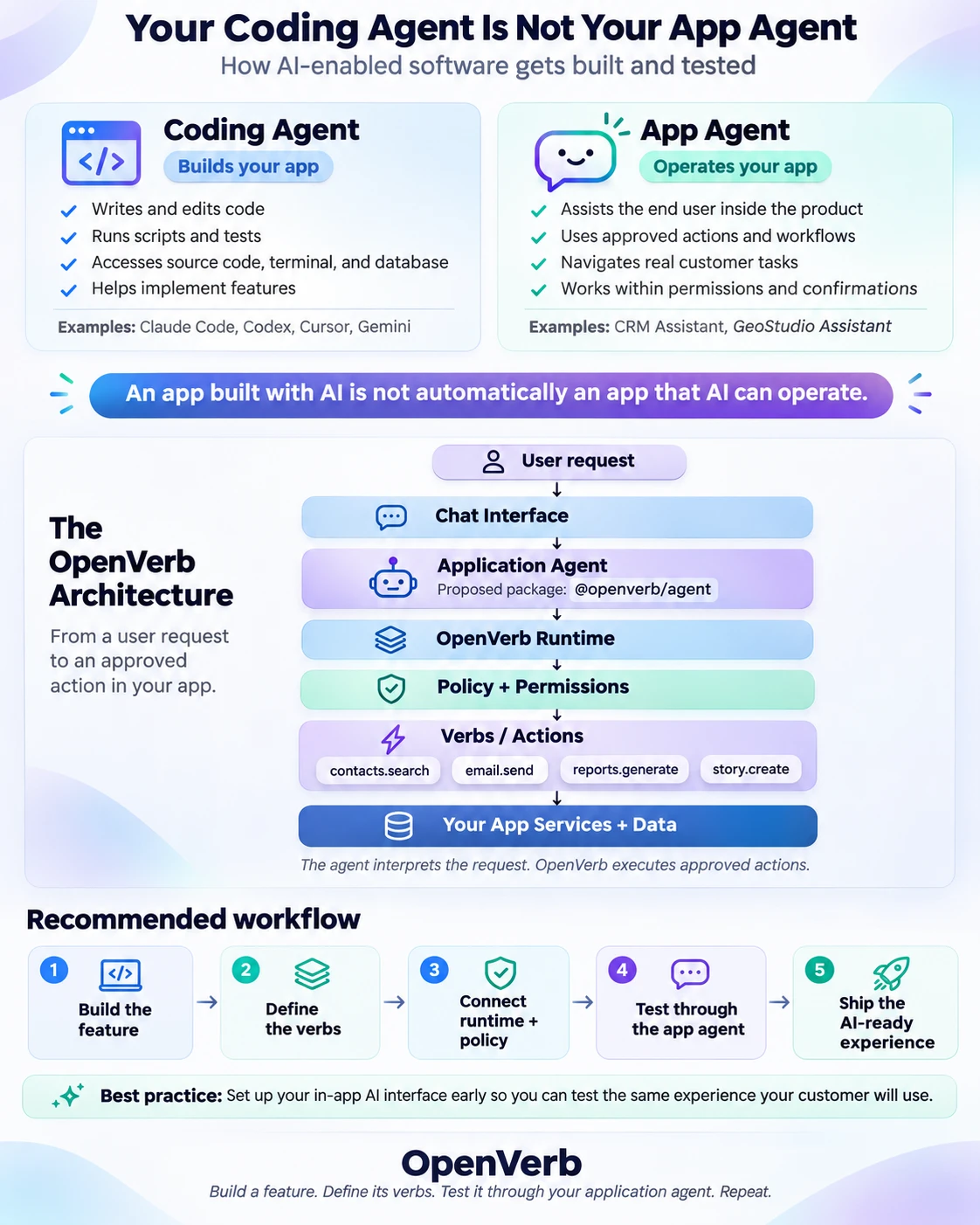
@openverb/agent is a proposed package, not a published one.The coding agent: your development partner
Your coding agent lives in your development environment. It usually has access to your source code, your terminal, your database, your documentation and your test suite. Ask it to implement a feature and it can write and change code, install dependencies, run scripts, query the database, run tests, read logs and debug what breaks.
That access is what makes it so useful. It is also its blind spot: your coding agent can do things your customers never can. It can finish a task by running a script straight against your database, even when your product has no screen, button or assistant through which a customer could do the same thing. The feature “works,” and the customer experience is still missing.
The application agent: your product's assistant
Your application agent is the AI that lives inside the software you are building, and acts on behalf of the people who use it.
- In a CRM, it looks up contacts, drafts follow-ups and replies to customer threads.
- In a GIS platform, it creates maps, imports datasets, runs spatial analysis and builds geographic stories.
- In a banking app, it moves the customer between pages, reads the information they are allowed to see, prepares forms and walks them through approved transactions.
Unlike your coding agent, it should never have the run of your servers. It should act only through capabilities you have defined, within permissions you have set, and leave a record of what it did. That is where the difference stops being a matter of wording and becomes architecture.
| Coding agent | Application agent | |
|---|---|---|
| Its job | Builds your app | Operates your app |
| Who it works for | You, the developer | Your customers |
| What it can reach | Code, terminal, database, tests | Only the actions you expose |
| How it is limited | Your review and your environment | Policies, permissions, confirmations |
| Examples | Claude Code, Codex, Cursor, Gemini | A CRM assistant, a GeoStudio assistant |
Test through your customer's eyes
Imagine a team building an AI-enabled banking app. They add a feature that lets customers complete an account application in plain language. The coding agent runs its scripts, checks the database, calls the API endpoints and reports that everything passes.
Then a real customer opens the app and types: “Help me apply for a new account.”
- Can the application agent get to the right page?
- Does it know which information is required?
- Can it fill in the right fields, and notice what is missing?
- Does it ask the customer to confirm before submitting?
- Does it explain clearly whether the application went through?
None of those questions is answered by the code passing its tests. Automated tests remain essential. Testing through the application agent is a second layer: it checks that the product can actually be operated through the AI experience your customers will use.
What I learned building GeoStudio
I ran into this myself. While building GeoStudio, we created a large number of geographic stories with AI. The workflow was productive: my coding agent, Claude, used its tools to generate stories and work directly with the implementation.
But GeoStudio itself had no AI assistant yet. The coding agent could create a story; a customer using the app could not. That is the gap between AI-assisted development and AI-enabled software, and it is easy to miss when the AI you build with is so capable.
Set up the application agent early
If you are building software that is meant to work with AI, the application agent should not be the last thing you bolt on. Make it part of the first architecture: put an AI interface in the app, connect it to a model, set its permissions, and give it a structured way to discover and run the app's capabilities.
Then, for every new feature, ask two questions:
- Can a customer use this through the normal interface?
- Can an authorized customer use this through the application agent?
For anything meant to support AI, both paths belong in development and testing. Rather than finishing a whole app and trying to make it AI-operable afterwards, you expose capabilities one at a time as the app grows.
The workflow I now recommend:
- Initialize the application.
- Set up the application agent: a model, a chat interface and an execution runtime.
- Build a feature with your coding agent.
- Define the verbs that expose that feature.
- Set policies: permissions, validation and confirmations.
- Test through both the normal interface and the application agent.
- Repeat.
Where OpenVerb fits
OpenVerb is the layer between the application agent and your app's business logic. You describe each action as a verb: a name, a description, typed parameters, and flags for anything destructive. The agent discovers the verbs and asks to run them; the runtime checks a policy, validates the arguments, runs your handler and returns a receipt of what happened.
In the official CRM template, for example, the verbs are things like contact.list, draft.create, draft.send and inbox.reply. A policy can let the assistant read and draft freely, but stop it from sending an email until the customer confirms, and never let it delete a contact. The CRM walkthrough builds exactly that, step by step.
This separates the intelligence that interprets a request from the infrastructure that carries it out. The model does not need unrestricted access to your database or your development environment to do meaningful work. It needs access to the right capabilities, and nothing more.
Why a governed, modular layer matters
It is easy to assume that AI is simple now: everybody has a chatbot, everybody knows how to prompt. But making software that AI can operate safely takes real structure. Which actions exist? Who may run them? What happens when the model gets the arguments wrong? Who confirmed the payment? Where is the record?
Large companies can afford teams to work through those questions from scratch. Most developers cannot: a solo founder, a small agency, a student, a public-sector team, a developer in a country where AI tooling is newer and resources are thinner. If the only way to build a trustworthy AI product is to reinvent the entire stack, then only a few organizations will build them.
OpenVerb breaks the problem into pieces anyone can understand: verbs say what can be done, policies say who may do it and when, the runtime enforces both, and receipts record what happened. Each piece is small, readable and replaceable. A team can start with a handful of verbs, add rules as they learn, and swap the model underneath without rewriting the rules.
That modularity is the point. When the building blocks are open and understandable, more people can build AI systems that act responsibly, not only the people who could afford to build those blocks themselves.
Toward an OpenVerb agent package
This points to a gap in the ecosystem. Today every developer has to assemble the application agent alone: a chat interface, a model integration, action discovery, an execution loop, confirmations. A dedicated package could provide that foundation, so you initialize an application agent on day one and register capabilities as you build them.
| Package | Role | Status |
|---|---|---|
| @openverb/runtime | Executes verbs, enforces policy, issues receipts | Published |
| @openverb/policy | Plan- and permission-based rules | Published |
| @openverb/sdk | Client integration | Published |
| @openverb/agent | Application agent and conversation loop | Proposed |
| @openverb/agent-react | Ready-made chat interface components | Proposed |
Here is what that could look like. This is a design sketch, not an installable package:
// PROPOSED API — @openverb/agent does not exist yet
import { createAgent } from '@openverb/agent'

const agent = createAgent({
  name: 'GeoStudio Assistant',
  model: modelProvider,     // the model you already use
  runtime: openVerbRuntime, // @openverb/runtime, which exists today
  verbs: [createStory, addScene, importDataset, createMap, exportStory],
})
The goal is not to replace coding agents. It is to make it easy for coding agents to build application agents. GeoStudio is the natural first place to prove it, followed by the other apps in the ecosystem.
A development philosophy
The next generation of software development is about more than using AI to write code. It is about designing software that AI can safely and reliably operate.
- Your coding agent builds your application.
- Your application agent operates your application.
- Your execution layer defines how intelligence becomes action.
Don't just build your application with AI. Build your application so that AI can use it.
Build a feature. Define its verbs. Test it through your application agent. Repeat. To see it end to end, follow the AI CRM walkthrough, or start with Getting started.
Read the original newsletter on LinkedIn.